How it works
Your personalized training plan in four steps
How your plan comes together
Four steps get you to your first personalized training plan. From then on, you tell the coach what changed, and it adjusts the sessions that are affected.
-
1
Pick your sports
Choose each sport with your level and goal, and add a race date if you have one coming up. For running and cycling, set the sessions per week. Fixed commitments like soccer or a class go in as a sport of your own, and you say how many minutes you have each day.
-
2
Get your plan
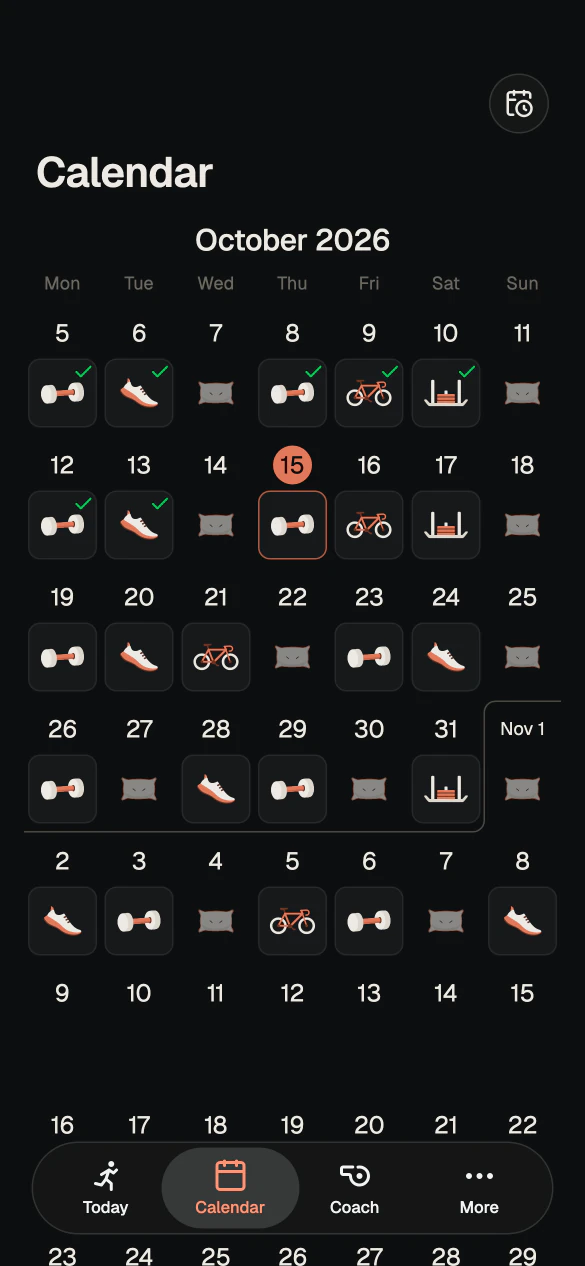
Every sport lands in one calendar, and hard days never sit back to back. Rest days are planned with a reason, and your daily nutrition targets come with the plan. That's a custom training plan built from what you told the coach.
-
3
Train and log
Your targets are already in the log, so you only enter what went differently. Workouts from Apple Health or Health Connect come in when you open the app, and a Garmin link in the chat fills in a run or a ride.
-
4
Keep going
When your week changes, tell the coach in the chat. Once you tap Apply, it rebuilds only the session that's affected and leaves the rest as it was, so you get a training plan that adapts to your schedule without starting over. When the plan runs out, one tap creates the next one, and the coach picks up where the last one stopped.
What a plan can look like
Here's how a personalized training plan can look with gym, running, cycling and HYROX in one calendar. Hard days are spread out, and every rest day comes with a reason.
- Mon Gym Push
- Tue Running Intervals
- Wed Rest
- Thu Gym Legs
- Fri Cycling Base
- Sat HYROX Stations
- Sun Rest
- Mon Gym Pull
- Tue Running Threshold
- Wed Cycling Easy
- Thu Rest
- Fri Gym Full body
- Sat Running Long run
- Sun Rest